

User Token Validation
This document will provide a detailed introduction to the definition, function, applicable scenarios, and filling rules of interface token validation, helping developers correctly understand and use the token validation function to ensure interface call security.
What is Token Validation?
Token Validation is a mechanism for interface security protection. It verifies the legitimacy of the caller's identity through the "User Token (Token)".
- Core Principle: After the user logs in successfully, the system generates a unique, time-limited string (i.e., Token); when calling interfaces that require permissions later, developers need to carry this Token in the request. The system decides whether to allow the interface call by verifying the validity of the Token (whether it exists, whether it has expired, whether it matches the user).
- Token Essence: An encrypted identity credential that avoids passing account passwords every time an interface is called, improving security and reducing the performance consumption of repeated verification.
Tip
Therefore, the official recommendation is to enable token validation in scenarios with security requirements to ensure interface call security.
Token Validation Scenario Example
Please ensure that the global token validation switch is turned on, otherwise the Token will not be validated during interface calls.
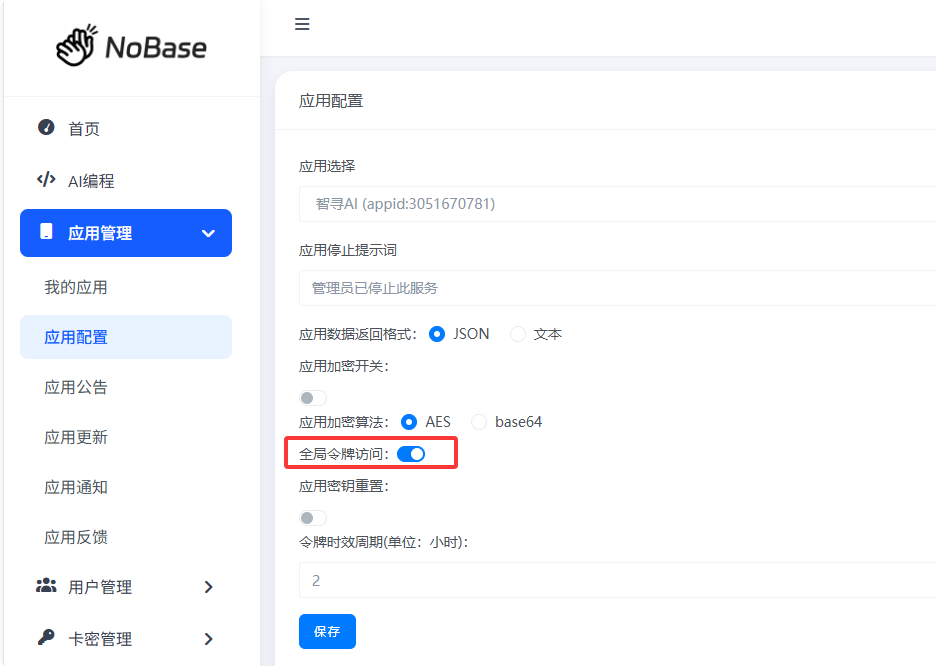
Considering non-professional users, Token is not enabled by default. When token validation is enabled in the backend, the token will be displayed, otherwise it will be an empty string.
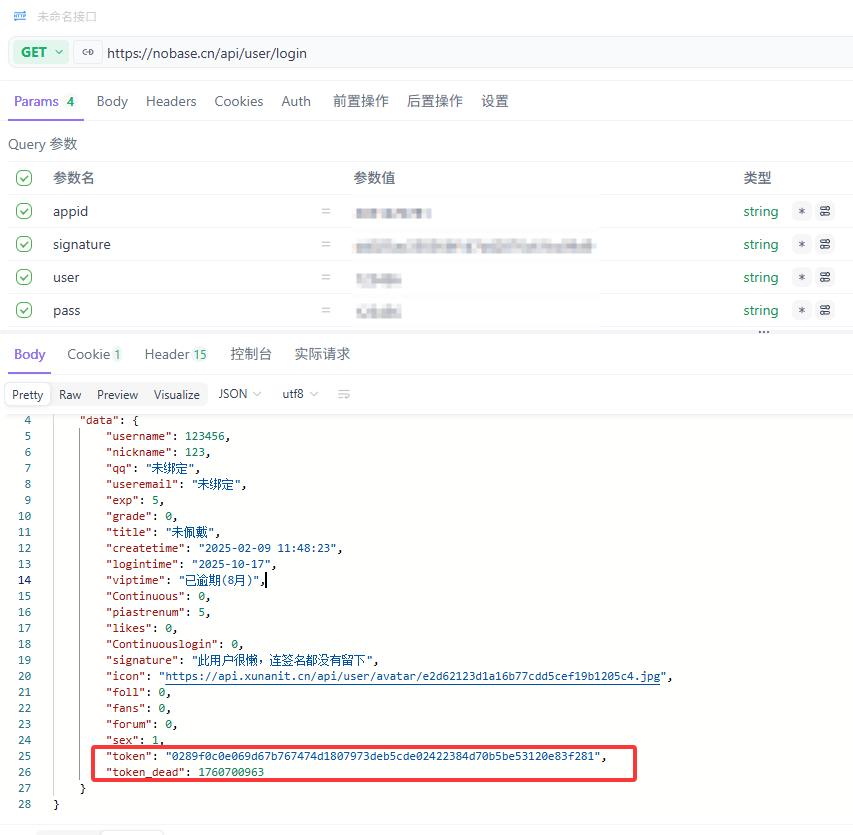
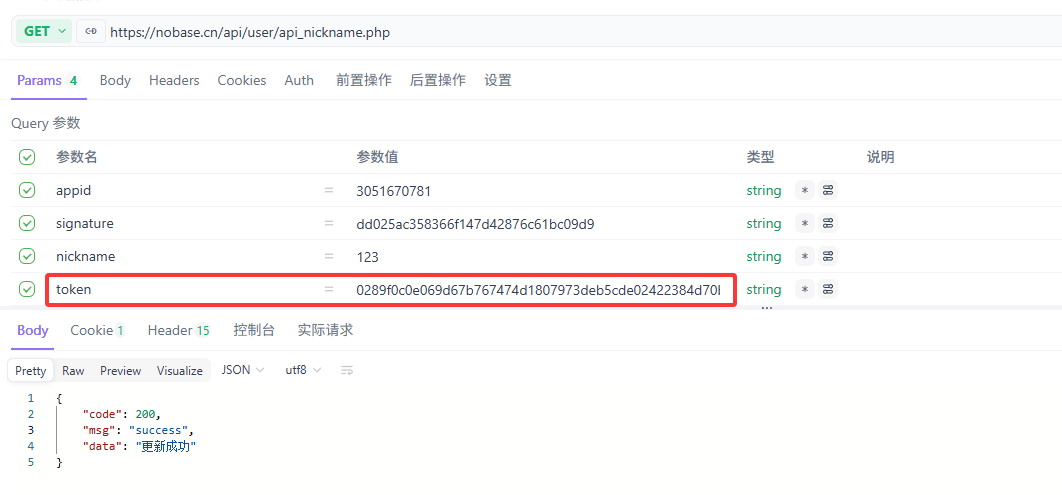
After obtaining this Token, add the Token to the end of the interface and send the request to call the interface normally.
token_dead is the expiration time of the token. If this time is exceeded, the token will become invalid and you need to log in again to get a new token.
Token validation enabled (modify user nickname interface) example:
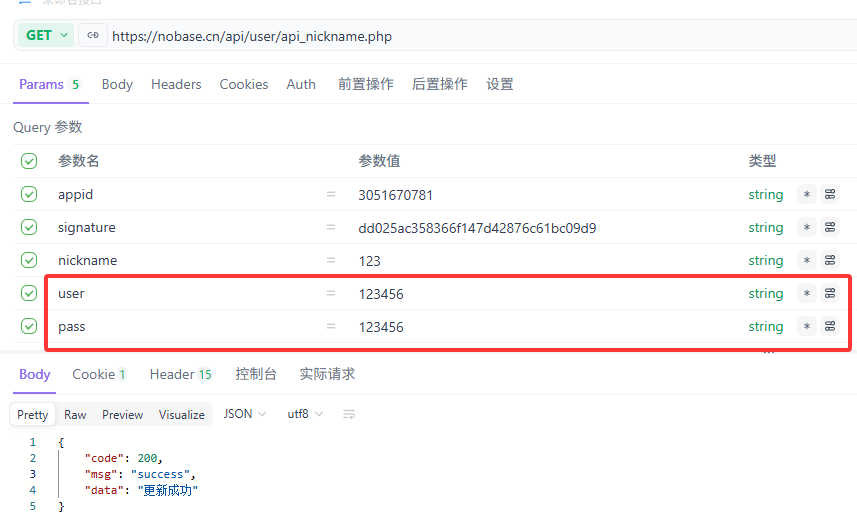
If token validation is not enabled, you need to fill in the user (account) and pass (password).
Token validation disabled (modify user nickname interface) example:
Core Functions of Token Validation
- Replace Account Password, Reduce Leak Risk When token validation is not enabled, interfaces need to frequently pass
user(account) andpass(password), and passwords are mostly in plain text; after enabling, only the Token needs to be passed, without exposing core account passwords, greatly reducing the probability of sensitive information leakage. - Control Interface Access Permissions The Token is bound to a specific user. Only users with a valid Token can call the interface, preventing unauthorized access by unlogged users or illegal users (such as modifying others' nicknames, obtaining others' data).
- Validity Period Control, Improve Security Tokens have a clear expiration time (such as 2 hours, 7 days). Even if the Token is stolen, attackers can only use it within the validity period; after expiration, you need to log in again to get a new Token, reducing long-term risks.
Common Issues and Troubleshooting
| Issue | Possible Cause | Troubleshooting Steps |
|---|---|---|
| Interface returns "Token Missing" | Not carrying the token parameter, or parameter name error (such as tokens) | 1. Check if the request parameters contain token; 2. Verify if the parameter name is consistent with the interface documentation |
| Interface returns "Token Invalid" | Token does not exist, has been revoked, or does not match the user | 1. Confirm that the Token was generated by the current user login; 2. Check if another user's Token was mistakenly used |
| Interface returns "Token Expired" | Token exceeded token_dead expiration time | 1. Compare the current time with the token_dead timestamp; 2. Log in again to get a new Token |